Dell tries to make durable laptops more modern with updated Latitude rugged line
Dell
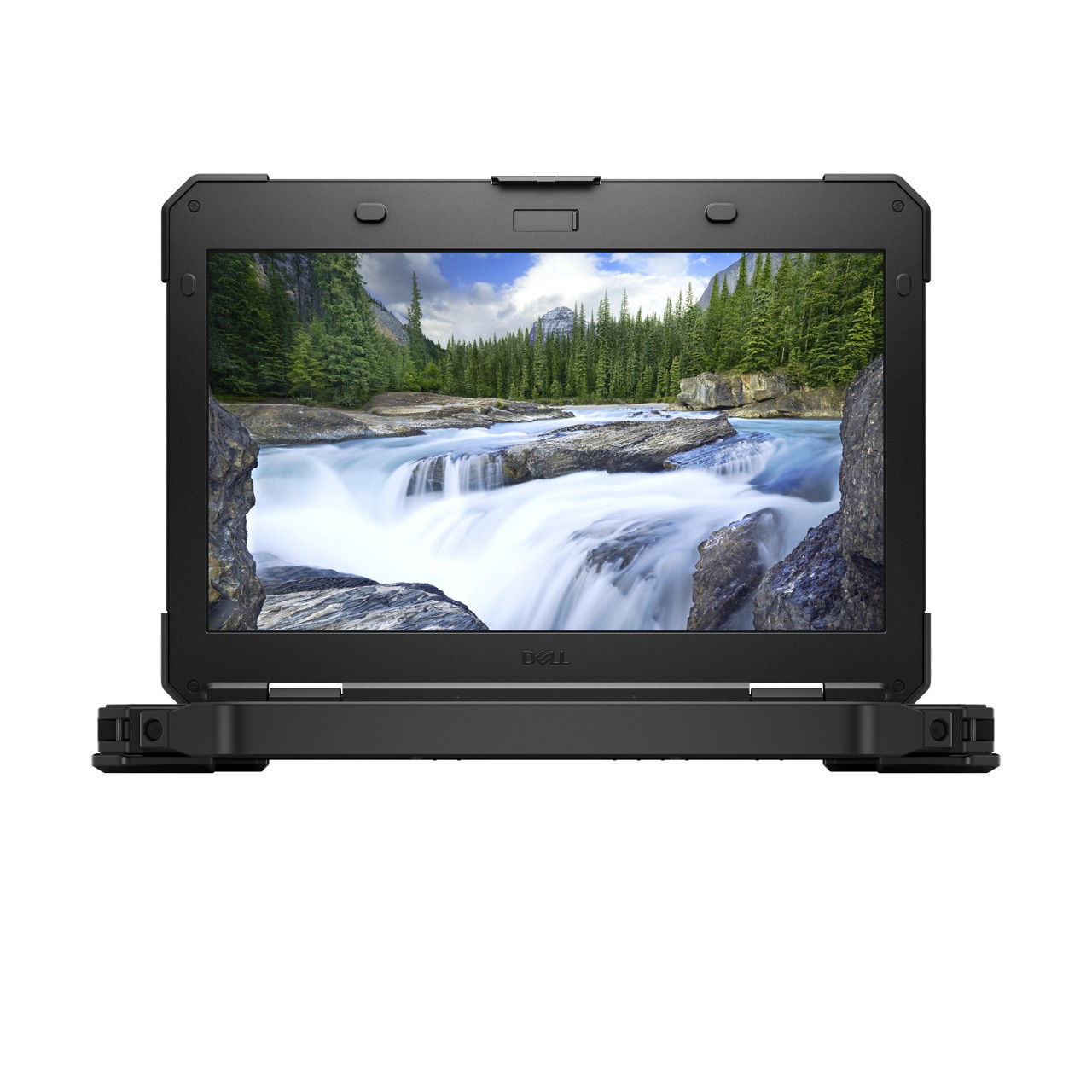
The Dell Latitude Rugged 5420.
Today, Dell announced availability of new models in its Latitude Rugged and Latitude Rugged Extreme laptop lines: the 5420, 5424, and 7424. These follow up on the previous 4414 and 7414 models.
The line is aimed at professional users working in factories, on offshore oil-rigs, in the military, in disaster-relief situations, and the like. Dell says it chose the Latitude brand, which is usually targeted at the enterprise space, in part because it aims to align the configurations of its Rugged and Extreme Rugged lines with those of the standard Latitude line in such a way that administrators can use the same image to deploy and manage systems across product lines.
The other key feature is interchangeable dual batteries. The thought here is that if you're working on-site somewhere, you can fill your truck with backup lithium-ion batteries to swap in and out. The laptop only needs one to run, so you can swap each one out as needed while the machine is still running to keep the laptop going for extended periods of time without a power cable.
For users working in these fields, a lot of what's offered here is familiar. But for the rest of us, it's interesting to see what a laptop focused on durability and legacy technology support looks like, as compared to many of today's popular consumer and workstation laptops that are design- and aesthetics-driven.
Thin machines and lovely designs are nice, but they often sacrifice legacy (or soon-to-be legacy) technologies like USB-A, and they can demand that users be very careful with their machines—to the point that many users would be too afraid to even buy a laptop without some kind of accidental-damage insurance.
The story is very different with these three rugged devices.
Models
As with a lot of Dell laptops, there are many configuration options. Generally, they are the same for each laptop; form factor and resilience are the differentiators between models. The "Rugged Extreme" model (the 7424) can handle more, while the simple "Rugged" 5424 handles a little less.The 5420 is all about making these beastly machines a little more portable than your average rugged laptop. Otherwise a derivative of the 5424, it is up to 22-percent lighter and thinner than the previous models, with the same durability promises as the 5424. The tradeoff is the lack of secondary hard-drive or optical-drive options.
Environmental protections
Dell's spec sheets claim the following for the 7424:
And the following for the 5424 and 5420:
Specifications and pricing
When discussing the new devices, Dell Director of Product Marketing Umang Patel told Ars that rugged laptops are often like "three-day-old pizza" in that they don't have the latest technologies and hardware options available in other workstations.
To address that point, Dell is offering eighth-generation Intel Core i5 and Core i7 CPU options for these machines, along with some older CPU choices. The standard graphics offerings include integrated Intel HD 520, 620, and UHD 620, depending on CPU. But you can configure the machines with AMD Radeon 540 or RX540 discrete GPUs.
All the new machines have 14-inch screens. The company claims the laptops' 1080p displays—which can reach 1,000 nits of brightness for viewing in bright, sunlit environments—have improved color gamut compared to previous models.
Solid state storage is standard, of course. Additionally, the 7424 and 5424 offer a Blu-ray optical drive option (as well as DVD). Wireless connectivity is key for many rugged laptop use cases, so we're looking at GPS and Cat16 4G/LTE with planned optional support for FirstNet with Band 14 access.
In terms of ports, all three include multiple USB-A and one USB-C, SD card, Ethernet, HDMI, and audio jack standard. Optional add-ons include VGA, PCMCIA, or DisplayPort. Ports are protected from the elements with closable doors.
The Latitude 7424 Rugged Extreme starts at $3,499, while the 5424 Rugged starts at $1,499, and the 5420 Rugged starts at $1,399. All three are available today.
Those are steep prices for what's included: you are definitely paying a premium for the durability features. But they're interesting examples of laptops with polar-opposite priorities from what you see in, say, a MacBook or a Microsoft Surface.
Comments
Post a Comment